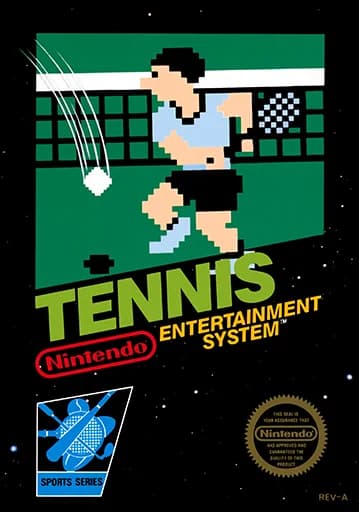
About Tennis
| Year | 1984 |
|---|---|
| Released | 1984-01-14 (Japan, Famicom); 1985-10-18 (North America) |
| Developer | Nintendo R&D1, Intelligent Systems |
| Publisher | Nintendo |
| Genre | Sports (tennis) |
| Players | 1–2 |
Tennis is a tennis game developed and published by Nintendo, first released for the Famicom in Japan on January 14, 1984, and in North America in October 1985 as one of the console's 17 launch games there. Shigeru Miyamoto is credited as designer and artist. An arcade version, VS. Tennis, came out the same year, and a Game Boy port followed in 1989.
According to Wikipedia, the game has singles and doubles. Singles puts one player against the computer, and doubles puts two human players on the same team against two computer players. The computer opponent has five difficulty levels, and Mario is the umpire.
The version on this page is the NES cartridge. The title screen reads TENNIS, lists SINGLES GAME and DOUBLES GAME, and shows © 1983 Nintendo Co., Ltd. Choosing a mode brings up a SELECT LEVEL box numbered 1 to 5. On court you see a Nintendo banner, a Com/You scoreboard and the umpire's chair; in testing he called "FAULT?" on a serve.
The D-pad is the arrow keys, A is Z and B is X. Enter is Start and V is Select.
Controls
- Arrow keys = D-pad
- Z = A button
- X = B button
- Enter = Start
- V = Select
- Menu: SINGLES or DOUBLES, then SELECT LEVEL 1–5; Enter (Start) confirmed each choice in testing
- 1 = quick save state, 2 = quick load, 3 = change save slot (saved in this browser)
- Every key can be remapped in the emulator's Control Settings; USB/Bluetooth gamepads work too
- On phones/tablets, turn on the on-screen touch gamepad from the game page
Tips
- Start at level 1 to learn the timing before moving up.
- Move early so you reach the ball before it passes you.
- Watch the umpire's calls to see why a serve didn't count.
- Doubles needs two people: both humans play on the same team.
FAQ
- Can two players play against each other?
- No. According to Wikipedia, doubles puts two human players on the same team against two computer players.
- How many difficulty levels are there?
- Five; the SELECT LEVEL box shows 1 to 5.
- Who is the umpire?
- Mario.
Sources
- Wikipedia: Tennis (1984 video game)
- Wikipedia: List of Nintendo Entertainment System games
- github.com/EmulatorJS/EmulatorJS (v4.2.3 default keyboard map)
Last updated:

Player comments
0 approvedNo public comments yet. Share a memory from this game.