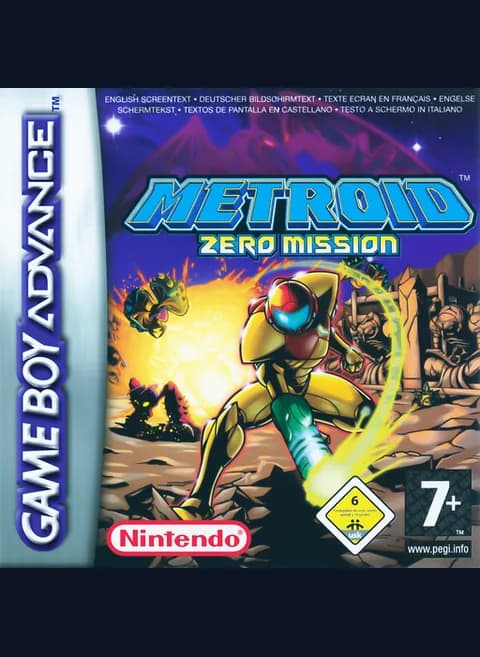
About Metroid: Zero Mission
| Year | 2004 |
|---|---|
| Released | NA 2004-02-09 · AUS 2004-03-19 · EU 2004-04-08 · JP 2004-05-27 |
| Developer | Nintendo R&D1 |
| Publisher | Nintendo |
| Genre | Action-adventure |
| Players | 1 |
Metroid: Zero Mission is Nintendo's 2004 remake of the original Metroid (1986) for the Game Boy Advance. Nintendo R&D1 developed it, and Yoshio Sakamoto directed it. It came out in North America on February 9, 2004, and in Europe that April. This copy is the European release, which starts with a language select for English, German, French, Italian and Spanish.
You play as the bounty hunter Samus Aran. She travels to the planet Zebes after learning that the Space Pirates are experimenting with Metroids, parasitic creatures they plan to use to take over the universe. Her mission is to destroy Mother Brain, the mechanical life-form that controls the Pirates' fortress. Along the way she faces Kraid and Ridley.
Zebes is a large, open world of caverns connected by doors and elevators. Power-ups upgrade Samus's suit and weapons and give her new abilities, which open up areas you couldn't reach before. You can play in order or find shortcuts that skip sections, a technique called sequence breaking. Save your progress in Save Rooms or at Samus's ship.
Compared with the original, the remake adds items, areas, mini-bosses, difficulty levels and a rewritten story. It also adds a new area, Chozodia, and a section where Samus has to sneak around without her Power Suit. Finishing the game unlocks an emulated version of the original Metroid.
Controls
- Arrow keys = D-pad
- Z = A button
- X = B button
- Enter = Start
- V = Select
- Q = L shoulder
- E = R shoulder
- 1 = quick save state, 2 = quick load, 3 = change save slot (saved in this browser)
- Every key can be remapped in the emulator's Control Settings; USB/Bluetooth gamepads work too
- On phones/tablets, turn on the on-screen touch gamepad from the game page
Tips
- Save often in Save Rooms or at Samus's ship. You can also use the emulator's save states.
- Come back to areas you couldn't reach once you have new abilities.
- Experienced players can look for sequence breaks to skip sections.
- Finish the game to unlock an emulated version of the original Metroid.
FAQ
- Is Metroid: Zero Mission a remake?
- Yes. It remakes the original 1986 Metroid with new graphics, items, areas, mini-bosses and a rewritten story.
- How do I save in Metroid: Zero Mission?
- Use a Save Room or Samus's ship. Emulator save states also work in the browser.
- Why does the game start with a language menu?
- This is the European release, which supports English, German, French, Italian and Spanish. Choose English to play in English.
Sources
- Wikipedia: Metroid: Zero Mission
- Wikipedia: List of Game Boy Advance games
- Wikipedia: Metroid
- github.com/EmulatorJS/EmulatorJS (v4.2.3 default keyboard map)
- github.com/libretro/mgba
Last updated:
Player comments
0 approvedNo public comments yet. Share a memory from this game.