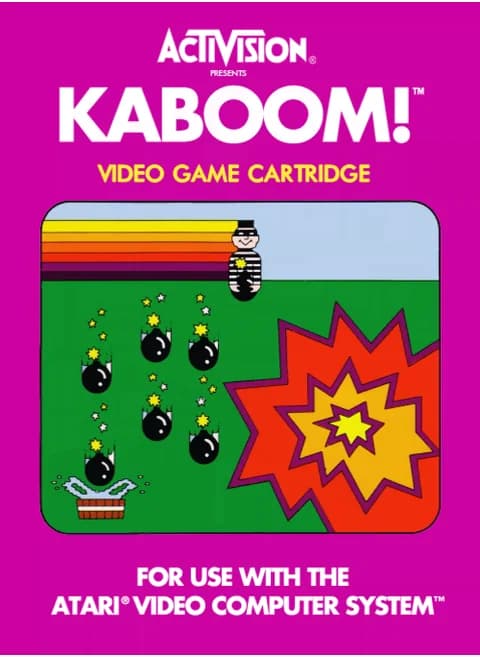
About Kaboom! (1981)
| Year | 1981 |
|---|---|
| Released | July 1981 |
| Developer | Activision |
| Publisher | Activision |
| Genre | Action |
| Players | 1–2 (alternating) |
Kaboom! is a 1981 action game that Activision made and published for the Atari 2600. Larry Kaplan programmed it, and David Crane drew the graphics for the buckets and the Mad Bomber. The idea came from Atari's 1978 arcade game Avalanche. Kaboom! was the last game Kaplan designed for Activision, since he left the company soon after it came out. Paul Wilson later ported it to the Atari 5200.
The setup is simple. The Mad Bomber walks along the top of the wall and drops bombs, and you move a stack of three water buckets left and right to catch them before they land. Every bomb you catch scores points, and the bombs fall faster the longer you survive. If you miss one, every bomb on screen goes off and you lose a bucket. A lost bucket comes back every 1,000 points. The game ends when the last bucket is gone.
Kaboom! was made for the paddle controller, which has a dial that slides the buckets smoothly across the screen. The console's difficulty switches can shrink the buckets to half their normal width. In the two-player game, players take turns, and each has a separate score. Reviewers singled out the Mad Bomber, whose face changes depending on how well you are doing.
Controls
- Arrow keys = joystick
- X = fire button
- Enter = console Reset switch (starts a game)
- V = console Select switch (cycles game modes)
- Q / Tab = left difficulty A / B; E / R = right difficulty A / B
- This is a paddle game: the arrow keys and X (joystick inputs) don't move the paddle
- Paddle: F / H = move the paddle (works, but coarse on a keyboard); S = paddle button. A gamepad with an analog stick is recommended
- V (Select) = choose one of the games/variations; Enter (Reset) = start
- 1 = quick save state, 2 = quick load, 3 = change save slot (saved in this browser)
- Every key can be remapped in the emulator's Control Settings; USB/Bluetooth gamepads work too
- On phones/tablets, turn on the on-screen touch gamepad from the game page
Tips
- Keep the buckets under the Mad Bomber rather than chasing bombs at the bottom, since every bomb starts from him.
- Losing a bucket makes the stack shorter, so you catch with less height. Every 1,000 points earns a bucket back.
- A gamepad with an analog stick is much easier than the F/H keys for fast waves.
- Leave the difficulty switches on B (full-width buckets) until you are comfortable.
FAQ
- What happens when I miss a bomb?
- Every bomb left on the screen explodes and you lose one of your buckets. You get a bucket back for every 1,000 points you score.
- Why don't the arrow keys move the buckets?
- Kaboom! is a paddle game, so the buckets follow the paddle dial, not the joystick. Use F and H, or a gamepad's analog stick.
- Is there a two-player mode?
- Yes. Two players take turns catching bombs, and each has a separate score.
Sources
- Wikipedia: Kaboom! (video game)
- Wikipedia: Avalanche (video game)
- Wikipedia: Activision
- github.com/EmulatorJS/EmulatorJS (v4.2.3 default keyboard map)
Last updated:


Player comments
0 approvedNo public comments yet. Share a memory from this game.