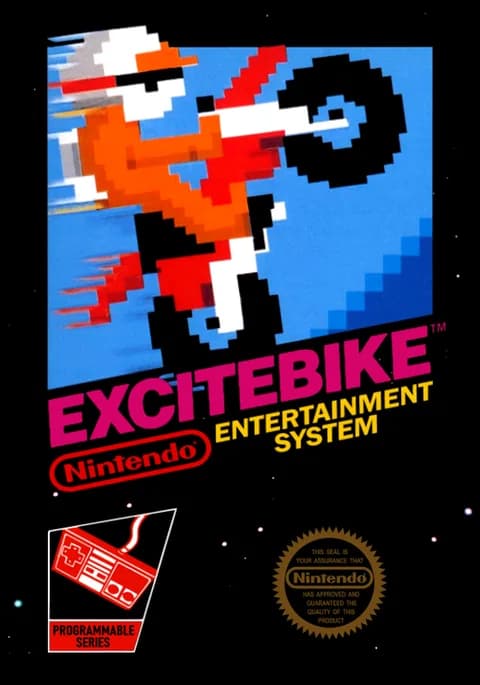
About Excitebike
| Year | 1984 (JP), 1985 (NA) |
|---|---|
| Released | JP 1984-11-30 · NA 1985-10-18 |
| Developer | Nintendo R&D4 |
| Publisher | Nintendo |
| Genre | Racing |
| Players | 1 |
Excitebike is Nintendo's 1984 motocross racing game for the Famicom and NES. It came out in Japan on November 30, 1984 and in North America on October 18, 1985, and it was the first game in the Excite series. Shigeru Miyamoto designed and directed it.
You race a motocross bike along a side-scrolling track full of ramps, mud and rough patches. Selection A puts you on the track alone against the clock, while Selection B adds computer-controlled riders. To qualify for the main race, you need to finish third or better in the preliminary race.
The key mechanic is the turbo. It makes you much faster, but it also heats up your engine. If the temperature gauge maxes out, your bike overheats and you have to sit still while it cools down. Driving over the arrow markers on the track resets the temperature, so good riders plan their turbo bursts around them. How you land a jump also matters. Land squarely on both wheels to keep your speed. An uneven landing slows you down or makes you crash.
Design mode lets you build your own tracks from 19 kinds of hurdles. The smooth scrolling engine Miyamoto's team built for Excitebike was later used to develop Super Mario Bros.
Controls
- Arrow keys = D-pad
- Z = A button
- X = B button
- Enter = Start
- V = Select
- In game: Z (A) = accelerate; X (B) = turbo (heats the engine); Up/Down = change lane; Left/Right = tilt the bike in the air
- 1 = quick save state, 2 = quick load, 3 = change save slot (saved in this browser)
- Every key can be remapped in the emulator's Control Settings; USB/Bluetooth gamepads work too
- On phones/tablets, turn on the on-screen touch gamepad from the game page
Tips
- Watch the temperature gauge. Ease off the turbo before it overheats, or you'll be stuck while the engine cools.
- Ride over the arrow markers to reset your engine temperature.
- Use Left/Right in the air to land squarely on both wheels and keep your momentum.
- Finish third or better in the preliminary race to qualify for the main race.
FAQ
- What's the difference between Selection A and B?
- Selection A is a solo race against the clock. Selection B adds CPU riders on the track with you.
- Why does my bike stop in Excitebike?
- You've overheated the engine by using too much turbo. Wait for it to cool down, and use the arrow markers to reset the temperature.
- Can I make my own tracks?
- Yes. Design mode lets you build tracks from 19 types of hurdles. Use the emulator's save states to keep a design.
Sources
- Wikipedia: Excitebike
- Wikipedia: List of Nintendo Entertainment System games
- github.com/EmulatorJS/EmulatorJS (v4.2.3 default keyboard map)
- github.com/libretro/libretro-fceumm
Last updated:
Player comments
0 approvedNo public comments yet. Share a memory from this game.