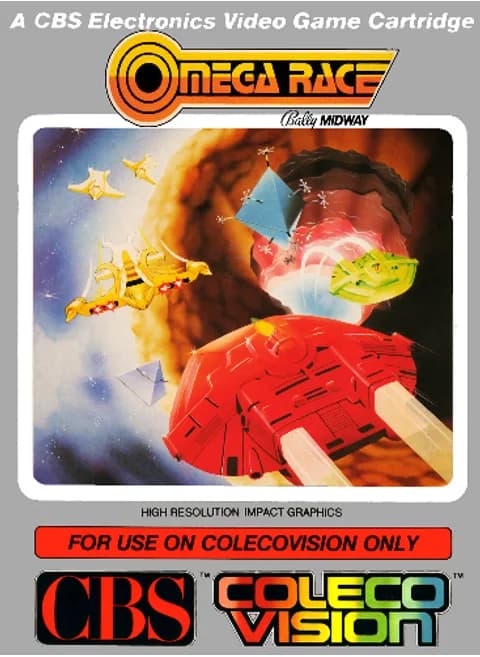
About Omega Race
| Year | 1983 |
|---|---|
| Released | ColecoVision: October 1983 (arcade original August 1981) |
| Developer | Midway (original); ColecoVision port |
| Publisher | Coleco (per title screen) |
| Genre | Shoot 'em up |
| Players | 1 |
Omega Race is a 1981 arcade shooter from Midway, designed by Ron Haliburton. It is the only Midway arcade game that uses vector graphics. Home versions followed for the Commodore 64 and VIC-20 in 1982, then for the ColecoVision and Atari 2600 in 1983. This page runs the ColecoVision version. Its title screen credits Bally Midway for the 1981 original and Coleco for the 1983 cartridge.
The game is set in the year 2003. You pilot an Omegan Fighter around a rectangular track and destroy the enemy droid ships that share it with you. In the arcade, a spinner rotates the ship, one button fires the thruster and another fires the laser. The enemies include drone ships, commander ships, two kinds of space mines and shooting star ships. When your ship hits the invisible barrier at the edge of the screen it bounces off, and the wall briefly lights up.
The ColecoVision version is one of only two games on the system, together with Victory, that natively support the Roller Controller trackball. Before each game it shows an options screen. It asks you to press 0 on the keypad for the standard game, or to pick one or more options with keypad 1–5 first: Fast Bounce, Tunnel, Astro Gates, Reflective Walls and Long Game. Then you press # to start.
Controls
- Arrow keys = joystick
- X = left (yellow) fire button
- Z = right (red) fire button
- 1–8 = keypad 1–8, Enter = keypad *, V = keypad #
- Options screen: keypad 1–5 (keys 1–5) = options, # (V) = start; the standard game asks for keypad 0, which has no default key
- Number keys 1–8 are the Coleco keypad on this system, so the 1/2/3 save-state hotkeys don't apply; use the emulator menu to save/load states
- Every key can be remapped in the emulator's Control Settings; USB/Bluetooth gamepads work too
- On phones/tablets, turn on the on-screen touch gamepad from the game page
Tips
- Keypad 0 has no default key on this site. Pick options with keys 1–5 and press # (V), or assign keypad 0 in Control Settings.
- Use short bursts of thrust. Your ship keeps drifting, and the invisible walls bounce it back into play.
- Watch out for the two kinds of space mines as well as the droid ships.
- By default you earn extra ships at 40,000 and 100,000 points.
FAQ
- How do I start a game?
- The options screen asks for keypad 0 for the standard game, or options 1–5 followed by #. Here # is V and keys 1–5 are keypad 1–5. Keypad 0 has no default key, so assign it in Control Settings if you want the standard game.
- What are the game options?
- Fast Bounce, Tunnel, Astro Gates, Reflective Walls and Long Game. You can combine more than one.
- Does the ColecoVision version support a trackball?
- Yes. Omega Race and Victory are the only two ColecoVision games that natively support the Roller Controller.
Sources
- Wikipedia: Omega Race
- Wikipedia: List of ColecoVision games
- Wikipedia: ColecoVision
- github.com/EmulatorJS/EmulatorJS (v4.2.3 default keyboard map)
Last updated:
Player comments
0 approvedNo public comments yet. Share a memory from this game.